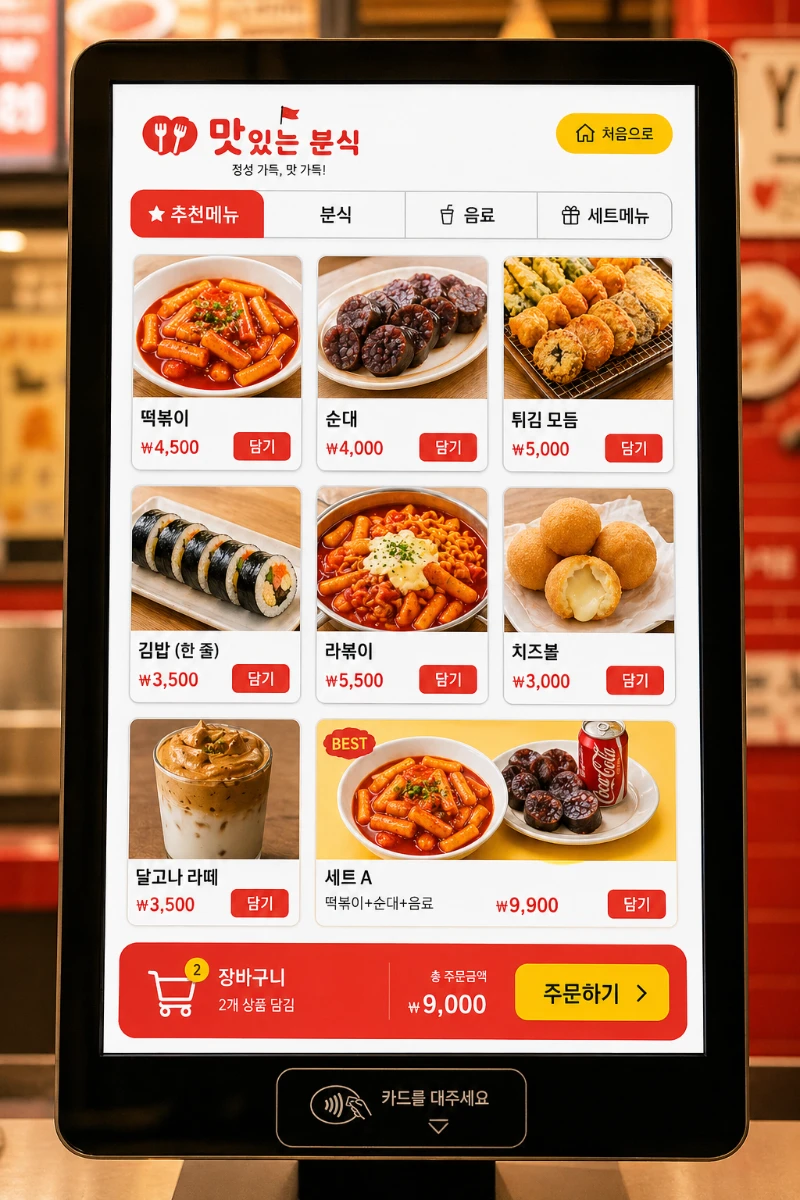
식당이나 분식집에서 실제로 사용할 수 있는 태블릿 키오스크 메뉴판 디자인을 AI로 생성하는 프롬프트입니다.
📋 0번 복사
박
박켄지
✦ 예시 결과물
AI로 생성한 예시 결과물실제 AI 출력 캡처
광고 · Google AdSense 728×90
📋 프롬프트 바로 적용하기
Create a high-quality tablet kiosk menu screen UI design mockup for a Korean fast food and street food restaurant (분식집).
[Device & Layout]
- Tablet screen in landscape or portrait orientation
- Realistic kiosk screen with bezels and stand base visible
- Clean, modern touch-screen UI layout
- Grid-style menu item cards (2–3 columns)
[Design Style]
- Bold, energetic color scheme: red, yellow, white (fast food vibe)
- Large food photography thumbnails for each menu item
- Rounded card UI components with soft shadows
- Clear Korean + price typography (ex: 떡볶이 ₩4,500)
- Category tab bar at the top: 추천메뉴 / 분식 / 음료 / 세트메뉴
- "담기" (add to cart) button on each item card
- Cart summary bar at the bottom showing total and order button
[Menu Items to Display – edit freely]
· 떡볶이 ₩4,500
· 순대 ₩4,000
· 튀김 모둠 ₩5,000
· 김밥 (한 줄) ₩3,500
· 라볶이 ₩5,500
· 치즈볼 ₩3,000
· 달고나 라떼 ₩3,500
· 세트 A (떡볶이+순대+음료) ₩9,900
[Atmosphere]
- Bright, appetizing, clean and modern
- Designed for easy touch interaction
- Realistic mockup feel – as if photographed in a real restaurant
- High resolution, UI/UX design portfolio quality
Render as a photorealistic kiosk mockup, high quality, detailed screen design.
🚀 사용법
[Menu Items] 부분을 내 가게 실제 메뉴와 가격으로 교체합니다
색상 컨셉을 바꾸고 싶다면 red, yellow, white 부분을 원하는 색으로 수정하세요
프롬프트를 붙여넣고 이미지를 생성합니다
결과물을 디자이너에게 전달하거나 레퍼런스로 활용하세요
💡 팁 1: portrait orientation → 세로형 / landscape → 가로형으로 변경 가능해요
💡 팁 2: 카페 스타일로 바꾸려면 색상을 brown, cream, white로만 수정하면 돼요
💡 팁 3: "주문 완료 화면도 만들어줘" 라고 추가 요청하면 결제 화면까지 세트로 제작 가능해요